AutoRunner is a comprehensive test automation suite that combines AI-powered test case generation, centralised test management and intelligent parallel execution. It covers a broad testing need, from smoke and sanity through full regression, with CI/CD integration, BDD-based automation and cross-browser support.
CaseWriter generates test cases from your requirements and flags the gaps left in coverage. Smoke, sanity and regression suites are ready without being written by hand. Writing a scenario no longer depends on knowing how to code, and the QA team moves without waiting for developer support.
Centralised Quality Management
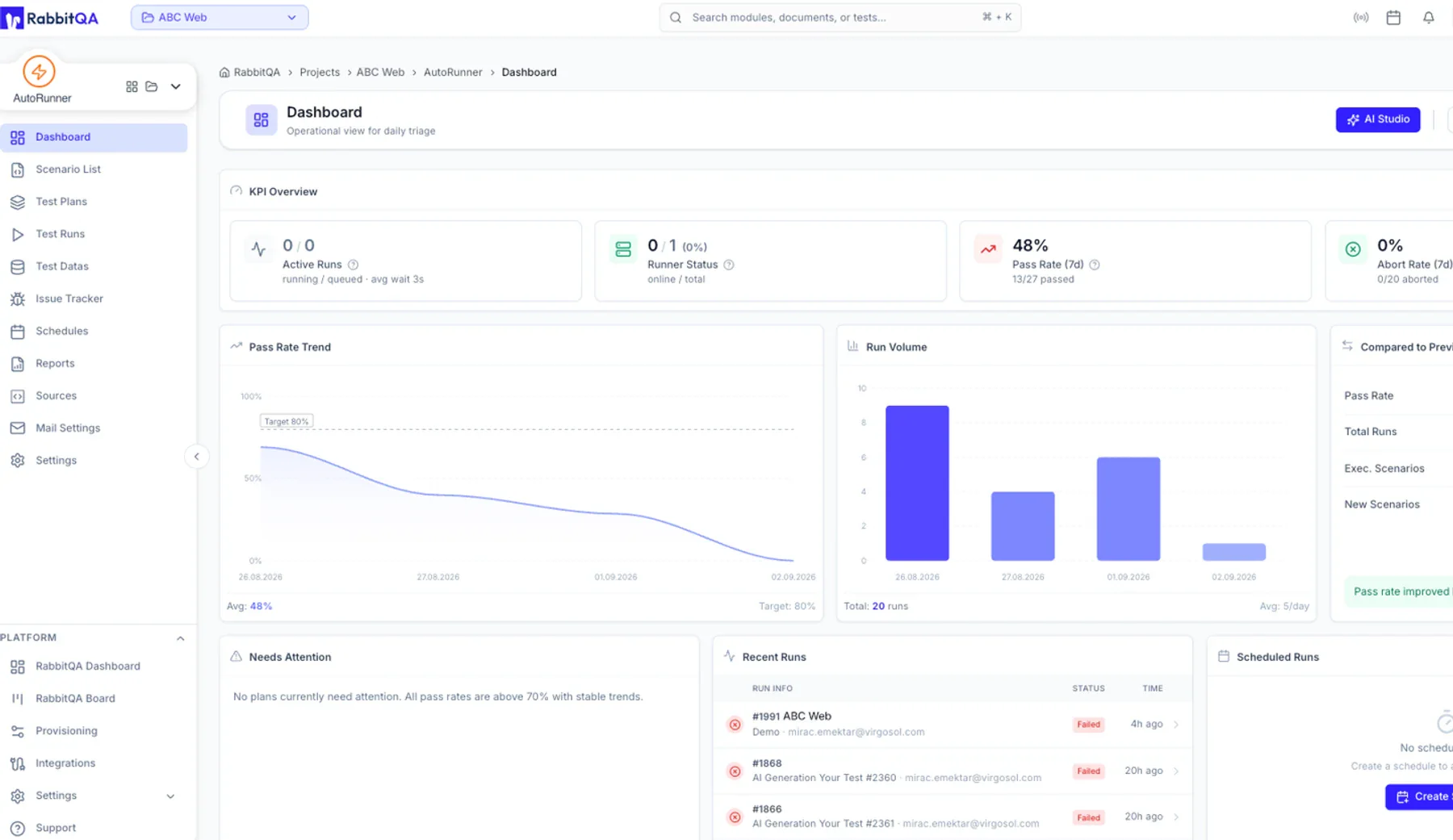
TestPilot brings planning, execution and reporting together on one screen. Which team ran which test and where, what passed and what failed, all of it becomes visible. Teams manage their own suites independently while management follows the whole picture from a single panel.
Intelligent Parallel Execution
Tests are ordered by what changed in the code and by historical defect data, then executed in parallel. In a limited test window, the riskiest flows run first. The regression cycle completes without the team waiting on it.
BDD and Cross-Browser Support
Scenarios can be written in BDD format, so the business and engineering read the same text. Web, mobile, API and desktop environments are supported, and cross-browser execution validates the same scenario across different browsers.
Native CI/CD Integration
AutoRunner works directly with Jenkins, GitLab CI, GitHub Actions and Azure DevOps. Testing is not a separate stage but a gate inside the pipeline. It does not wait on the release flow; it is part of it.
Executive Reporting
Test health is monitored in real time, and the quality indicators a release decision needs are produced automatically. The same run yields detail for the engineer and a board-ready summary for management.
With AutoRunner, regression stops being the step that holds up your release schedule.
How it works
1
Plan
Import your requirements and build your test plan. CaseWriter proposes scenarios and shows coverage gaps while you are still planning.
Who is it for?
Multi-team organisations
Organisations where several teams touch the same product and coordination is itself a cost.
Product teams releasing frequently
High-tempo teams where manual regression can no longer keep pace with release frequency.
Regulated industries
Banking, insurance and telecommunications teams that must produce an audit trail and compliance evidence.
Teams running multiple frameworks
Environments where Selenium, Playwright, Appium and Cypress sit side by side with no shared reporting.
Teams consolidating tools
Teams that want fewer testing tools but cannot write off the investment they have already made.
What Changes?
Before
With AutoRunner
Disconnected automation tools
One orchestration layer for every framework
No unified view of test coverage
Centralised planning and execution
Manual regression
Risk-based automated regression management
Release decisions made on instinct
Release decisions made on data
Code-dependent scenario writing
AI and BDD scenario generation
KPIs invisible to management
Clear, traceable KPIs for management
Works seamlessly with the tools you already use
Jira
Azure DevOps
GitHub
Jenkins
Slack
Confluence
TestNG
Selenium
Built for high-risk digital environments.
Proven experience in industries where the cost of a performance failure is highest.
How long does it take to get started with AutoRunner?+
AutoRunner is built on top of your existing test frameworks, so there is no automation structure to create from scratch. In a typical start, pipeline integration and connecting the first test suite are completed within a few days. Coverage then expands gradually as teams import their existing scenarios.
Can it integrate with our current automation tools?+
Yes. AutoRunner works with Selenium, Playwright, Appium and Cypress, and integrates natively with Jenkins, GitLab CI, GitHub Actions and Azure DevOps. You do not need to rewrite your test cases. Your existing automation keeps running, and AutoRunner adds an orchestration and reporting layer on top.
How many users and teams can work at the same time?+
AutoRunner is designed for multi-team enterprise use. Teams manage their own test suites separately while management sees quality indicators for every team on one panel. User and concurrent execution capacity are configured according to your deployment model.
What is test orchestration?+
Test orchestration is the planning, execution and reporting of tests written in different frameworks from a single layer. The aim is not to rewrite the tests but to bring a fragmented automation investment under one visibility and decision layer. AutoRunner provides that layer.
References
Evaluate AutoRunner against your own regression suite
Complete the form and we will review your current automation rate, regression coverage and release frequency together. By the end of the conversation we will show you, in concrete terms, how much time you stand to gain and on which test suites.